Showing posts with label Maya. Show all posts

Thursday, 9 May 2013

Maya Tutorials check list


Intro to Autodesk Maya:
Character Modelling Part 1:
http://lucy-yelding.blogspot.co.uk/2012/10/cgi-artists-toolkit-maya-character-re.html
Texturing & Shaders:
http://lucy-yelding.blogspot.co.uk/2012/12/maya-pencil-character-shading-lighting.html
Textuing UV maps:
http://lucy-yelding.blogspot.co.uk/2012/12/maya-pencil-character-shading-lighting.html
Character Textung & Lighting:
http://lucy-yelding.blogspot.co.uk/2012/12/maya-pencil-character-shading-lighting.html
Lights & Shadows:
http://lucy-yelding.blogspot.co.uk/2012/12/maya-pencil-character-shading-lighting.html
Using Rigs:
http://lucy-yelding.blogspot.com/2012/11/cgi-artists-toolkit-maya-using-rigs.html
Motion Path:
http://lucy-yelding.blogspot.co.uk/2012/11/cgi-artists-toolkit-maya-motion-lines.html
MEL:
http://lucy-yelding.blogspot.co.uk/2012/11/cgi-artists-toolkit-maya-motion-lines.html

Lighting & Rendering:
All but Interior lighting:
http://lucy-yelding.blogspot.co.uk/2012/12/whimsy-house-lighting.html

Digital Set:
all but UV mapping
http://lucy-yelding.blogspot.co.uk/2013/05/maya-digital-set-old-alley.html

Previz:
Pitch, Pan, Roll, dolly & Crane:
http://lucy-yelding.blogspot.co.uk/2013/02/maya-pre-viz-tutorials.html

Intro to Character Animation:
All below:
http://lucy-yelding.blogspot.co.uk/2013/02/cgi-artist-toolkit-maya-animation.html

Intro to texturing
All below:

Rigging and constraints:
Leg rig, mechanical leg, can exchange, fox tail rig:

Deformers: 
All below:

Render layers and Compositing:
All below:

Maya tutorials: Rigging & Constraints

Biped Rigging Part 1: Feet & Legs
Rigging Techniques 1: Leg Piston
Rigging Techniques 3: Object Exchange
Rigging Techniques 4: Tails

Maya: Digital Set Old Alley

Modelling
Bumping + Lighting 
 Final Render

Maya Tutorials: Intro to Texturing

Ulitlities & Shading Networks: Sampler Info Node (Double Sided Shader)


Ulitlities & Shading Networks: Sampler Info Node (Xray's)
Ulitlities & Shading Networks: Sampler Info Node (Faked Rim Lights)
Ulitlities & Shading Networks: Sampler Info Node (Transparency)
Surface Texturing Part 1: Maya Fur Presets & Attributes


Surface Texturing Part 2: Fur Hat


Maya Tutorials: Render Layers & Compositing

Stereo Camera Rigs in Photoshop & After Effects


Render Layers Part 1: Software Rendering
Photoshop 1


Photoshop 2

After Affects

Render Layers Part 2: Depth of Field 

Photoshop
After Affects


Render Layers Part 3: Mental Ray & Matte Passes


Maya Tutorials: Deformers

Deformers Part 1: Non-Linear Deformers


Deformers Part 2: Blend Shapes with Inbetweens


Deformers Part 3: Creating Mirrored Blend Shapes


Deformers Part 4: Wire Deformers


Deformers Part 4: Sculpt Deformers


Friday, 3 May 2013

Tuesday, 30 April 2013

Unit 3: Fantastic Voyage: Scene development

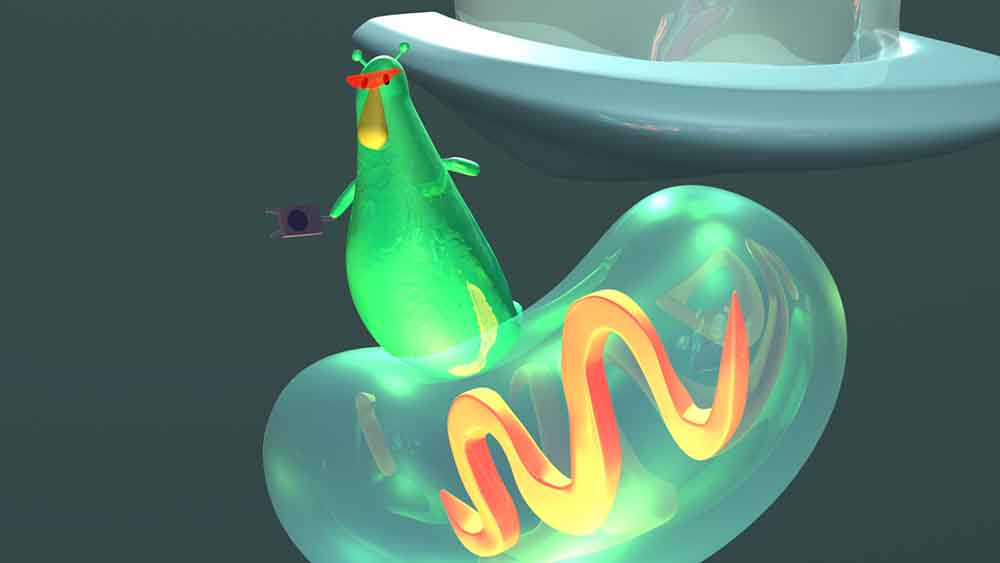
Trying thicker lines for my scene was suggested, and I really like the affect. Also this version is rendered with mental ray settings.
Here is the thinner lined version for comparison..

Sadly, when using the outline in mental ray, the toonlines have to be made into polygons, which don't animate very well. To keep the lines, I'll have to render scenes twice, once with the mentalray setting of all the scene/character, then again with just the toonline in maya software. Sigh!
The mitochondria look a lot better in mental ray render settings.. (a still from the short. Low quality jpeg as my computer doesn't like me saving over files while rendering. =( ) Here is one without the black line (has to be added later)

Saturday, 27 April 2013

Fantastic Voyage: Outlines

To get the toon outline, you have to render with maya software in the settings, so I had to fiddle around as I was rendering in a different setting! Here is how the scene with the black outline.
Featuring Goopher, he fits into the world nicely! 

I really like the affect on the mitochondria. 

Wednesday, 24 April 2013

Fantastic Voyage: Scene and Character so far..

I have almost completed the inside-cell scene for my animation, and currently in the process of making pre-viz. Here is my progress so far..
The original drawing, for comparison:
I have been trying hard to translate the style into 3D.
The character, so far (Goopher? I still can't chose his name. It is such an important factor, it's proving hard to chose, still.)#

In the process of rigging. His eye brows and mouth will be added for each scene..


Tuesday, 12 February 2013

@Alan - Maya Tutorial Spot Check

Intro to Autodesk Maya:
Character Modelling Part 1:
http://lucy-yelding.blogspot.co.uk/2012/10/cgi-artists-toolkit-maya-character-re.html
Texturing & Shaders:
http://lucy-yelding.blogspot.co.uk/2012/12/maya-pencil-character-shading-lighting.html
Textuing UV maps:
http://lucy-yelding.blogspot.co.uk/2012/12/maya-pencil-character-shading-lighting.html
Character Textung & Lighting:
http://lucy-yelding.blogspot.co.uk/2012/12/maya-pencil-character-shading-lighting.html
Lights & Shadows:
http://lucy-yelding.blogspot.co.uk/2012/12/maya-pencil-character-shading-lighting.html
Using Rigs:
http://lucy-yelding.blogspot.com/2012/11/cgi-artists-toolkit-maya-using-rigs.html
Motion Path:
http://lucy-yelding.blogspot.co.uk/2012/11/cgi-artists-toolkit-maya-motion-lines.html
MEL:
http://lucy-yelding.blogspot.co.uk/2012/11/cgi-artists-toolkit-maya-motion-lines.html

Lighting & Rendering:
All but Interior lighting:
http://lucy-yelding.blogspot.co.uk/2012/12/whimsy-house-lighting.html

Previz:
Pitch, Pan, Roll, dolly & Crane:
http://lucy-yelding.blogspot.co.uk/2013/02/maya-pre-viz-tutorials.html

Intro to Character Animation:
Ball Bounce, Travel & Rotation, Stretch & Squash, Arm grab:
http://lucy-yelding.blogspot.co.uk/2013/02/cgi-artist-toolkit-maya-animation.html


*This is incomplete*
I have lost my digital set progress, will update later once USB is found!

CGI artist Toolkit: Maya: Intro to Character Animation

The Bouncing Ball Part 1: On the Spot


  The Bouncing Ball Part 2: With Travel & Rotation

  Settle & Rest: Pendulum

Secondary Action & Overlap: Hanging Chain


Squash & Stretch: Jumping


Anticipation & Follow-through: Can Snatch

Installing & Using 'Felix Jnr' Character Rig

Walk Cycles Part 1: Mechanics

Maya: Pre-Viz Tutorials

Camera Control: Pan, Roll, and Pitch Shots


Camera Control: Crane, Dolly, and Distance Shots


  Camera Control: Focal Length (Contra-Zoom), Coverage, & Camera Shake

Tuesday, 11 December 2012

Further scene modelling


It's finally coming together! The circle above may look unpleasing but it'll be pure white with a glow to look like light.

Progress on scene so far..

I have the hero prop and 2 weapons left to add in, and the mirrors. Also the tubes from platform to platform

Monday, 10 December 2012

Lesser Robot model


This is the lesser robot that will be decorating the edges of the scene and have his body parts scattered over the place. 


Sunday, 2 December 2012